


Widget #NaN: support_center_article
Name: General BIM Link tutorial - How to activate the link
ID: dd351d35-2833-4fa2-a88f-9c0c8769c77d
Show Raw Data
{
"title": {
"name": "Main headline (H1)",
"type": "text",
"value": "How to activate the link"
},
"preview_image": {
"name": "Preview image",
"type": "asset",
"value": []
},
"post_date": {
"name": "Post date",
"type": "date_time",
"value": null,
"displayTimeZone": null
},
"perex_content": {
"name": "Lead paragraph",
"type": "text",
"value": ""
},
"content": {
"images": [
{
"description": "IDEA start up window 25.0",
"imageId": "4a678807-07f6-408f-ae20-26c6a018d269",
"url": "https://assets-us-01.kc-usercontent.com:443/28eac049-c8ed-00e2-220c-12142a968dff/649a6f99-4ce2-4fa9-9ccf-876c0578ab47/IDEA%20start%20up%20window.jpg",
"height": 857,
"width": 1680
},
{
"description": null,
"imageId": "7633f2b4-f9be-41c3-9208-3f7031d8b5ab",
"url": "https://assets-us-01.kc-usercontent.com:443/28eac049-c8ed-00e2-220c-12142a968dff/5d2e07d6-e3ba-4c8d-b7cc-3d2e765eb5c4/bim-link.png",
"height": 1200,
"width": 1143
}
],
"linkedItemCodenames": [],
"linkedItems": [],
"links": [
{
"codename": "landing_page___downloads",
"linkId": "0dff6482-3e17-4ca2-bb66-b4abc6a8dde4",
"urlSlug": "product-downloads",
"type": "landing_page"
},
{
"codename": "bim_links__supported_versions",
"linkId": "eeb85fd1-4708-4f88-ad36-cbe30ac41eb7",
"urlSlug": "bim-links-supported-versions-of-3rd-party-applications",
"type": "support_center_article"
}
],
"name": "Content",
"type": "rich_text",
"value": "<ul>\n <li>Download and install the <a data-item-id=\"0dff6482-3e17-4ca2-bb66-b4abc6a8dde4\" href=\"\">latest version of IDEA StatiCa</a></li>\n <li>Make sure that you are using a <a data-item-id=\"eeb85fd1-4708-4f88-ad36-cbe30ac41eb7\" href=\"\">supported version</a> of your FEA solution</li>\n</ul>\n<p>IDEA StatiCa integrates BIM links into your FEA software during its installation. You can check the status and eventually integrate more BIM links by running IDEA StatiCa and opening the <strong>BIM links</strong>. Please note that some FEA software require additional steps to fully activate their BIM link to IDEA StatiCa.</p>\n<figure data-asset-id=\"4a678807-07f6-408f-ae20-26c6a018d269\" data-image-id=\"4a678807-07f6-408f-ae20-26c6a018d269\"><img src=\"https://assets-us-01.kc-usercontent.com:443/28eac049-c8ed-00e2-220c-12142a968dff/649a6f99-4ce2-4fa9-9ccf-876c0578ab47/IDEA%20start%20up%20window.jpg\" data-asset-id=\"4a678807-07f6-408f-ae20-26c6a018d269\" data-image-id=\"4a678807-07f6-408f-ae20-26c6a018d269\" alt=\"IDEA start up window 25.0\"></figure>\n<p>A notification \"<em>Do you want to allow this app to make changes to your device?</em>\" may appear, if so, please confirm with the <strong>Yes</strong> button.</p>\n<p>By clicking <strong>Install</strong>, the BIM link for the selected software is integrated. The screen also tells you the status of other BIM links.</p>\n<figure data-asset-id=\"7633f2b4-f9be-41c3-9208-3f7031d8b5ab\" data-image-id=\"7633f2b4-f9be-41c3-9208-3f7031d8b5ab\"><img src=\"https://assets-us-01.kc-usercontent.com:443/28eac049-c8ed-00e2-220c-12142a968dff/5d2e07d6-e3ba-4c8d-b7cc-3d2e765eb5c4/bim-link.png\" data-asset-id=\"7633f2b4-f9be-41c3-9208-3f7031d8b5ab\" data-image-id=\"7633f2b4-f9be-41c3-9208-3f7031d8b5ab\" alt=\"\"></figure>"
},
"regions": {
"name": "Region",
"type": "taxonomy",
"value": [
{
"name": "EMEA",
"codename": "emea"
},
{
"name": "AMER",
"codename": "amer"
},
{
"name": "APAC",
"codename": "apac"
}
],
"taxonomyGroup": "region"
},
"product_groups": {
"name": "Product group",
"type": "taxonomy",
"value": [
{
"name": "Steel",
"codename": "steel"
}
],
"taxonomyGroup": "product_group"
},
"support_center_article_types": {
"name": "Support center article",
"type": "taxonomy",
"value": [
{
"name": "Knowledge base",
"codename": "knowledgebase_article"
}
],
"taxonomyGroup": "support_center_article"
},
"expertise_levels": {
"name": "Expertise level",
"type": "taxonomy",
"value": [
{
"name": "Beginner",
"codename": "beginner"
},
{
"name": "Intermediate",
"codename": "intermediate"
}
],
"taxonomyGroup": "expertise_level"
},
"labels": {
"name": "Labels",
"type": "taxonomy",
"value": [
{
"name": "BIM link",
"codename": "bim_links"
}
],
"taxonomyGroup": "labels"
},
"linked_items": {
"name": "Linked items",
"type": "modular_content",
"value": [],
"linkedItems": []
},
"attachments__files": {
"name": "Attachments",
"type": "asset",
"value": []
},
"content_priority__value": {
"name": "Content priority value",
"type": "number",
"value": null
},
"options": {
"name": "Options",
"type": "multiple_choice",
"value": []
},
"url_slug": {
"name": "Url slug",
"type": "url_slug",
"value": "how-to-activate-the-link"
},
"unique_url_slug": {
"name": "Unique URL slug",
"type": "custom",
"value": "[\"how-to-activate-the-link\",\"[autogenerated]\"]"
},
"content_settings__sitemap": {
"name": "Show in sitemap",
"type": "multiple_choice",
"value": [
{
"name": "default",
"codename": "default"
}
]
},
"content_settings__robots": {
"name": "Search engine indexing",
"type": "multiple_choice",
"value": [
{
"name": "default",
"codename": "default"
}
]
},
"content_settings__is_hidden": {
"name": "Hidden nested content",
"type": "multiple_choice",
"value": []
},
"content_settings__is_topped": {
"name": "Topped",
"type": "multiple_choice",
"value": []
},
"metadata__page_title": {
"name": "Page title",
"type": "text",
"value": ""
},
"metadata__page_description": {
"name": "Page description",
"type": "text",
"value": ""
},
"metadata__page_keywords": {
"name": "Page keywords",
"type": "text",
"value": ""
},
"metadata__canonical_url": {
"name": "Canonical URL",
"type": "text",
"value": ""
},
"metadata__og_title": {
"name": "OG:title",
"type": "text",
"value": ""
},
"metadata__og_description": {
"name": "OG:description",
"type": "text",
"value": ""
},
"metadata__og_image": {
"name": "OG:image",
"type": "asset",
"value": []
},
"translation__translation_connector": {
"name": "Translation Connector",
"type": "taxonomy",
"value": [],
"taxonomyGroup": "languages"
},
"translation__force_translation": {
"name": "Force translation",
"type": "multiple_choice",
"value": []
},
"translation__last_translation": {
"images": [],
"linkedItemCodenames": [],
"linkedItems": [],
"links": [],
"name": "Last translation",
"type": "rich_text",
"value": "<p><br></p>"
},
"translation__ai_translated": {
"name": "AI translated",
"type": "multiple_choice",
"value": []
},
"page_tree_settings__page_label": {
"name": "Page label",
"type": "text",
"value": ""
},
"page_tree_settings__path_segment": {
"name": "Path segment",
"type": "text",
"value": ""
},
"page_tree_settings__breadcrumb_style": {
"name": "Breadcrumb style",
"type": "multiple_choice",
"value": []
},
"page_tree_settings__hide_in_breadcrumbs": {
"name": "Hide in breadcrumbs",
"type": "multiple_choice",
"value": []
}
}There are some additional manual steps required in SAP2000 to finish the integration procedure. These vary depending on the version of SAP2000:
How to use the link
Open the attached AISC project in SAP2000 and run the calculation.
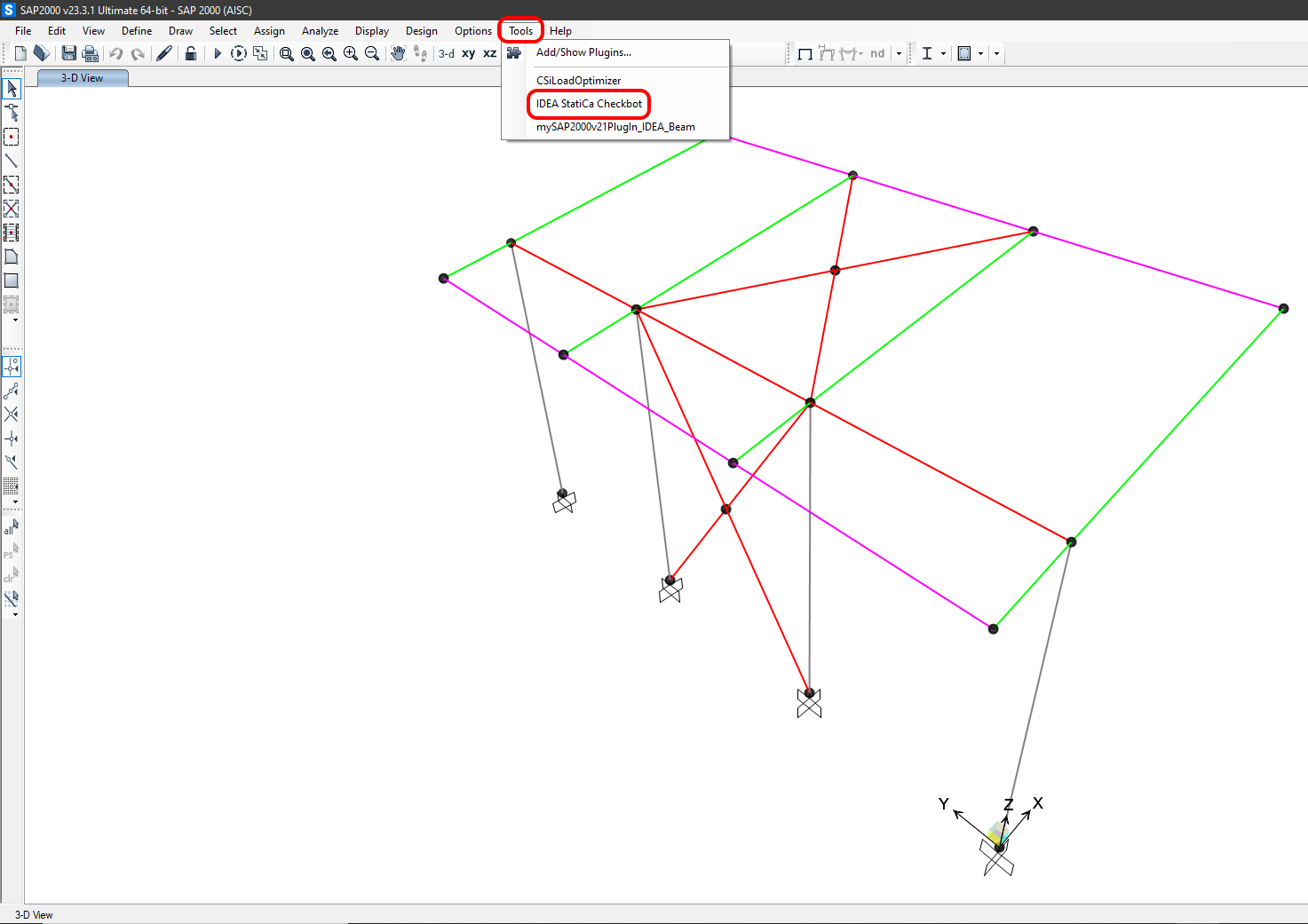
The BIM link should be already integrated. You can find it in the top ribbon under Tools -> IdeaSAP2000v1PluginWrapper. This will open the Checkbot application.
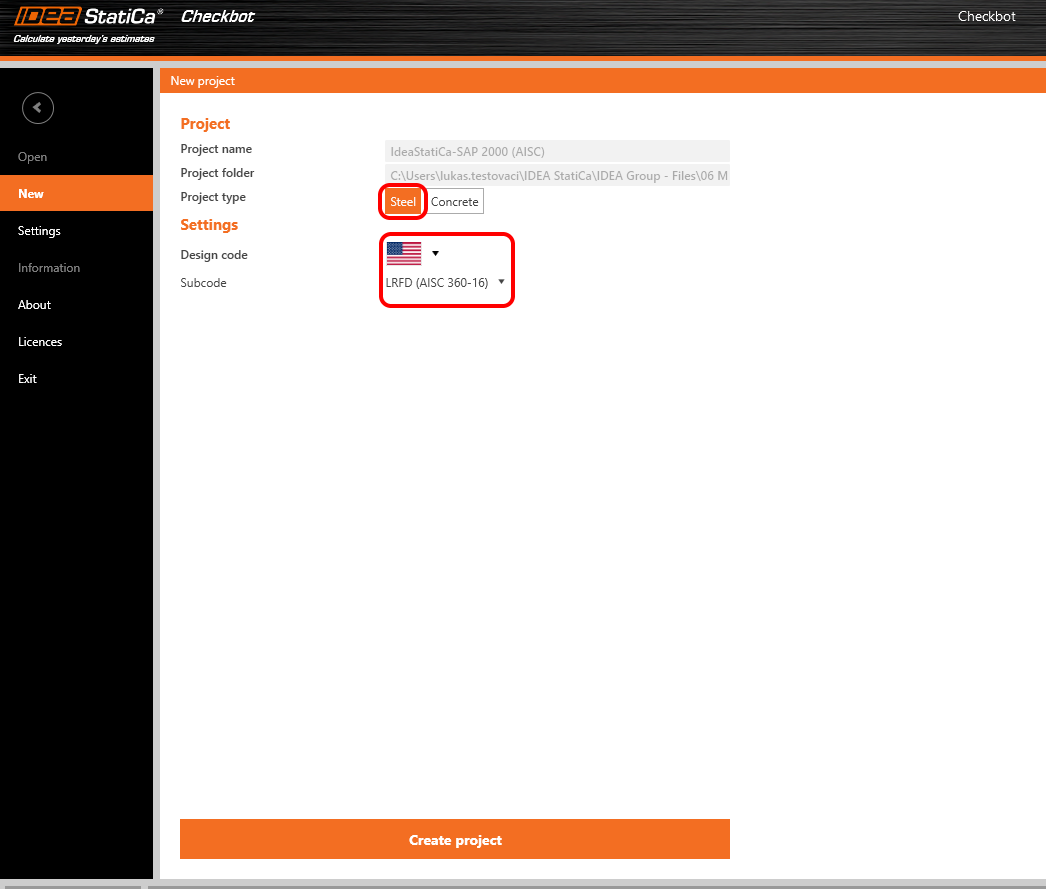
Select the New option with project type Steel, AISC design code, and sub-code LRFD (AISC 360-16). Then select Create project.
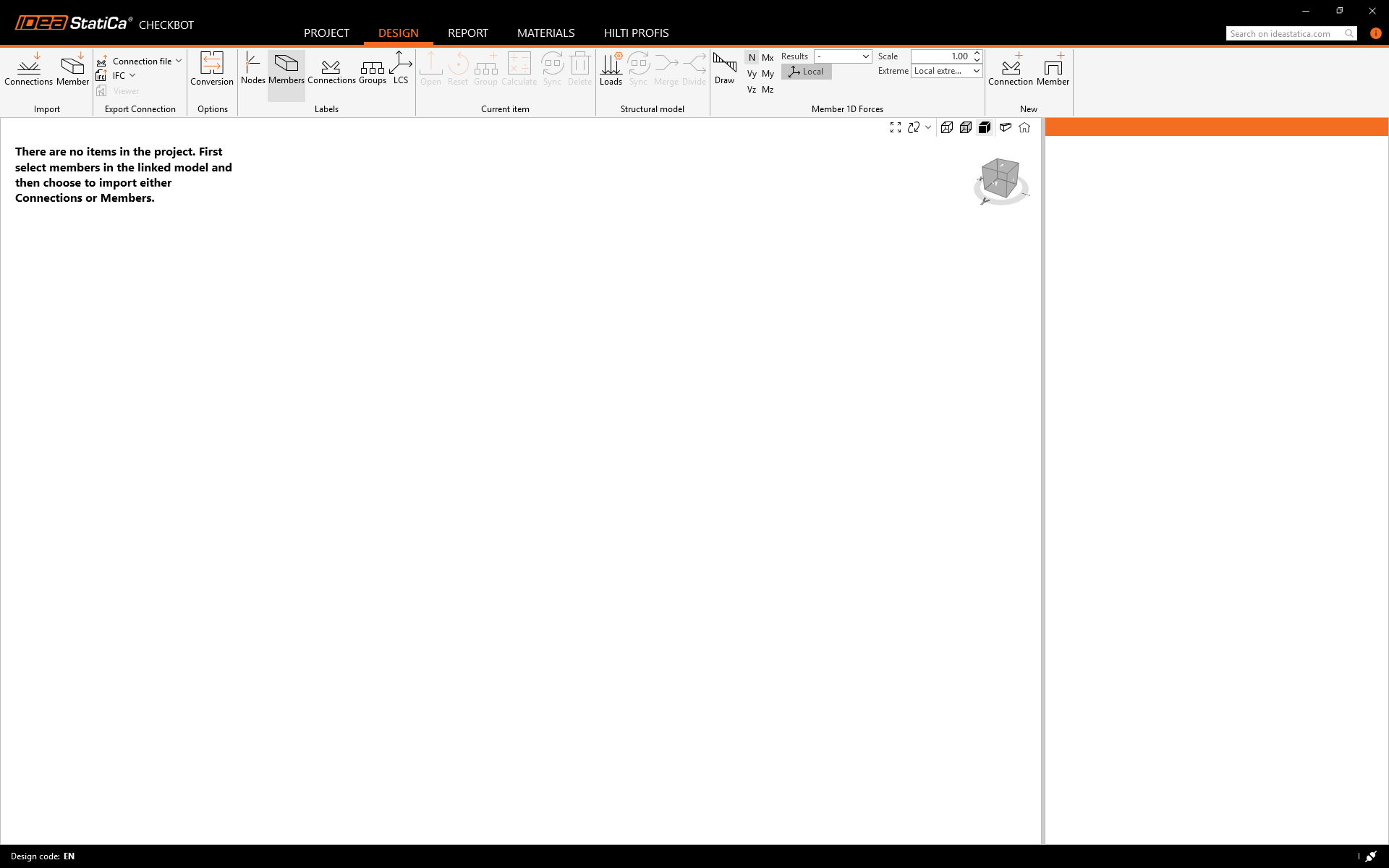
The new Checkbot project is ready to import connections from SAP2000.
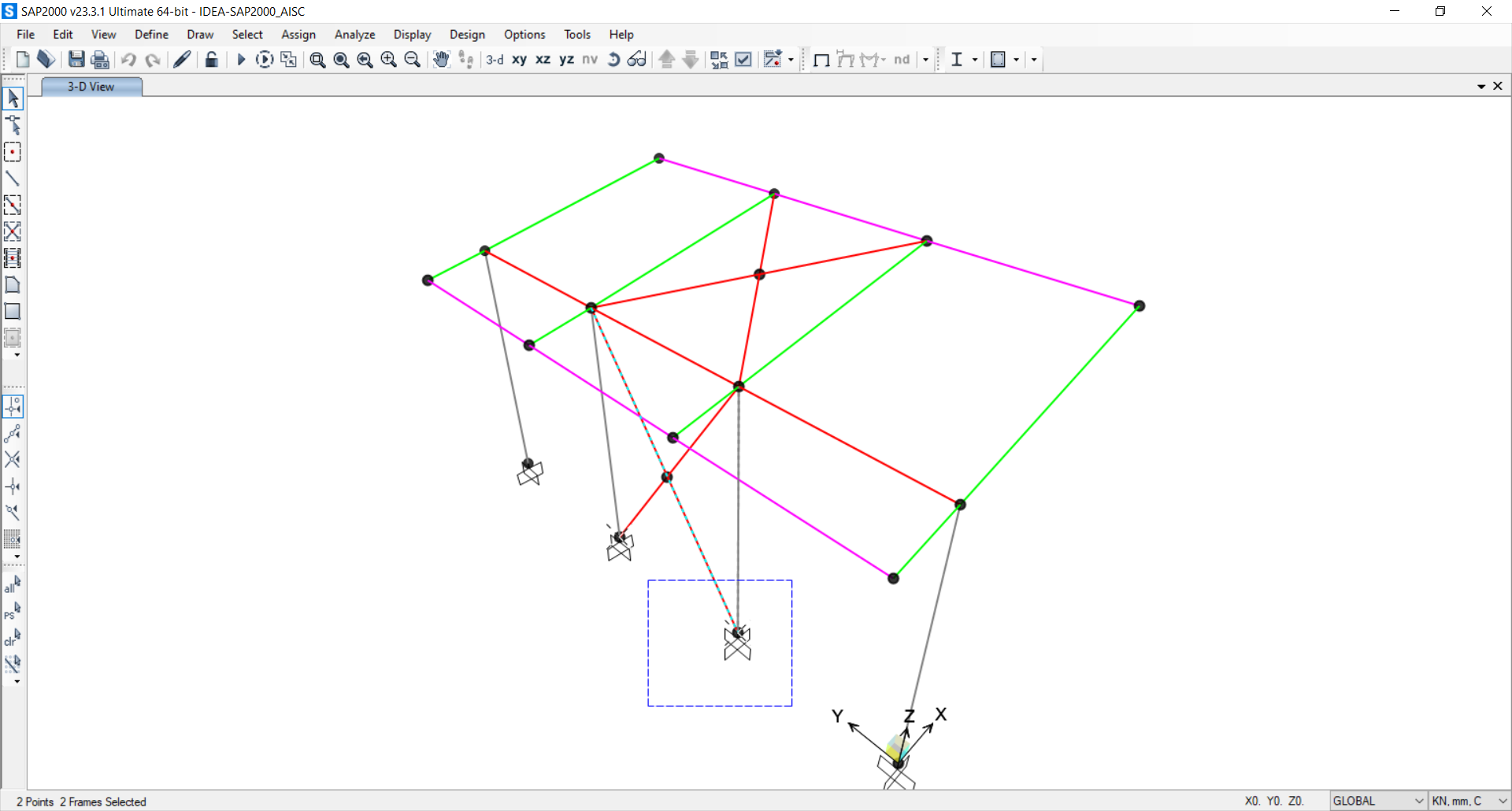
In SAP2000, select one of the inside columns making sure you also select the lowest node.
Widget #NaN: support_center_article
Name: General BIM Link tutorial - Import
ID: 4014d755-0bf0-43d9-a46c-da9ce928f004
Show Raw Data
{
"title": {
"name": "Main headline (H1)",
"type": "text",
"value": "Import"
},
"preview_image": {
"name": "Preview image",
"type": "asset",
"value": []
},
"post_date": {
"name": "Post date",
"type": "date_time",
"value": null,
"displayTimeZone": null
},
"perex_content": {
"name": "Lead paragraph",
"type": "text",
"value": ""
},
"content": {
"images": [
{
"description": null,
"imageId": "9e8f6845-e105-4892-a3bd-9def81d98bb6",
"url": "https://assets-us-01.kc-usercontent.com:443/28eac049-c8ed-00e2-220c-12142a968dff/e734e597-4d88-471b-80f1-6b622107eea4/import%20node.png",
"height": 1032,
"width": 1920
},
{
"description": null,
"imageId": "4cd06b43-6f27-4e21-ab5b-13b6520951eb",
"url": "https://assets-us-01.kc-usercontent.com:443/28eac049-c8ed-00e2-220c-12142a968dff/fc21c861-7d5f-4418-af2a-f7ee319aa914/single%20connection%20in%20checkbot.png",
"height": 1032,
"width": 1920
},
{
"description": null,
"imageId": "be4f07d7-d6e4-4bd3-8acd-2507951101d8",
"url": "https://assets-us-01.kc-usercontent.com:443/28eac049-c8ed-00e2-220c-12142a968dff/43f14268-3a11-43ba-9e9a-b5a84af9d4cf/RFEM%20-%20load%20configurator.png",
"height": 1136,
"width": 1918
},
{
"description": null,
"imageId": "bb64cd03-216e-4036-b058-f51b5bef237a",
"url": "https://assets-us-01.kc-usercontent.com:443/28eac049-c8ed-00e2-220c-12142a968dff/1803d6c5-85a0-42ec-97de-fcb751b17a46/all%20structure.png",
"height": 1032,
"width": 1920
}
],
"linkedItemCodenames": [],
"linkedItems": [],
"links": [],
"name": "Content",
"type": "rich_text",
"value": "<p>Then in Checkbot select <strong>Connections</strong>.</p>\n<figure data-asset-id=\"9e8f6845-e105-4892-a3bd-9def81d98bb6\" data-image-id=\"9e8f6845-e105-4892-a3bd-9def81d98bb6\"><img src=\"https://assets-us-01.kc-usercontent.com:443/28eac049-c8ed-00e2-220c-12142a968dff/e734e597-4d88-471b-80f1-6b622107eea4/import%20node.png\" data-asset-id=\"9e8f6845-e105-4892-a3bd-9def81d98bb6\" data-image-id=\"9e8f6845-e105-4892-a3bd-9def81d98bb6\" alt=\"\"></figure>\n<p>This will import the column and its load effects into Checkbot - with the same coordinates, orientations, and section sizes as per the FEA model.</p>\n<p>Please note that your node and member numbering might be different.</p>\n<figure data-asset-id=\"4cd06b43-6f27-4e21-ab5b-13b6520951eb\" data-image-id=\"4cd06b43-6f27-4e21-ab5b-13b6520951eb\"><img src=\"https://assets-us-01.kc-usercontent.com:443/28eac049-c8ed-00e2-220c-12142a968dff/fc21c861-7d5f-4418-af2a-f7ee319aa914/single%20connection%20in%20checkbot.png\" data-asset-id=\"4cd06b43-6f27-4e21-ab5b-13b6520951eb\" data-image-id=\"4cd06b43-6f27-4e21-ab5b-13b6520951eb\" alt=\"\"></figure>\n<p><strong>Before running the analysis, make sure to review the Result classes for checks </strong>and adjust the load cases accordingly<strong>.</strong> In the <strong>Load configurator </strong>dialog, you can see all imported load cases and load combinations on the left and the result classes used for checks in the middle. If some load cases are not relevant for your design verification, exclude them by right-clicking on the selected loads and removing them from the result classes list.</p>\n<figure data-asset-id=\"be4f07d7-d6e4-4bd3-8acd-2507951101d8\" data-image-id=\"be4f07d7-d6e4-4bd3-8acd-2507951101d8\"><img src=\"https://assets-us-01.kc-usercontent.com:443/28eac049-c8ed-00e2-220c-12142a968dff/43f14268-3a11-43ba-9e9a-b5a84af9d4cf/RFEM%20-%20load%20configurator.png\" data-asset-id=\"be4f07d7-d6e4-4bd3-8acd-2507951101d8\" data-image-id=\"be4f07d7-d6e4-4bd3-8acd-2507951101d8\" alt=\"\"></figure>\n<p>Please note the 3D workspace is designed to show an overview of the imported structure and not a detailed view of the actual connections. For more information on Checkbot, see <a href=\"https://www.ideastatica.com/support-center/checkbot-bulk-bim-workflows\" title=\"Checkbot\">here</a>.</p>\n<p>For several FEA solutions, you can also import multiple connections into Checkbot in the same manner as above. Instead of selecting one node and the connected members, you can select multiple nodes and members and import them all at once.</p>\n<figure data-asset-id=\"bb64cd03-216e-4036-b058-f51b5bef237a\" data-image-id=\"bb64cd03-216e-4036-b058-f51b5bef237a\"><img src=\"https://assets-us-01.kc-usercontent.com:443/28eac049-c8ed-00e2-220c-12142a968dff/1803d6c5-85a0-42ec-97de-fcb751b17a46/all%20structure.png\" data-asset-id=\"bb64cd03-216e-4036-b058-f51b5bef237a\" data-image-id=\"bb64cd03-216e-4036-b058-f51b5bef237a\" alt=\"\"></figure>"
},
"regions": {
"name": "Region",
"type": "taxonomy",
"value": [
{
"name": "EMEA",
"codename": "emea"
},
{
"name": "AMER",
"codename": "amer"
},
{
"name": "APAC",
"codename": "apac"
}
],
"taxonomyGroup": "region"
},
"product_groups": {
"name": "Product group",
"type": "taxonomy",
"value": [
{
"name": "Connection design",
"codename": "connection_design"
},
{
"name": "Steel",
"codename": "steel"
}
],
"taxonomyGroup": "product_group"
},
"support_center_article_types": {
"name": "Support center article",
"type": "taxonomy",
"value": [
{
"name": "Knowledge base",
"codename": "knowledgebase_article"
}
],
"taxonomyGroup": "support_center_article"
},
"expertise_levels": {
"name": "Expertise level",
"type": "taxonomy",
"value": [
{
"name": "Beginner",
"codename": "beginner"
},
{
"name": "Intermediate",
"codename": "intermediate"
}
],
"taxonomyGroup": "expertise_level"
},
"labels": {
"name": "Labels",
"type": "taxonomy",
"value": [
{
"name": "Connection",
"codename": "connection"
},
{
"name": "Checkbot",
"codename": "checkbot"
},
{
"name": "EN (Eurocode)",
"codename": "eurocode"
},
{
"name": "BIM link",
"codename": "bim_links"
},
{
"name": "AISC (USA)",
"codename": "aisc"
}
],
"taxonomyGroup": "labels"
},
"linked_items": {
"name": "Linked items",
"type": "modular_content",
"value": [],
"linkedItems": []
},
"attachments__files": {
"name": "Attachments",
"type": "asset",
"value": []
},
"content_priority__value": {
"name": "Content priority value",
"type": "number",
"value": null
},
"options": {
"name": "Options",
"type": "multiple_choice",
"value": []
},
"url_slug": {
"name": "Url slug",
"type": "url_slug",
"value": "import"
},
"unique_url_slug": {
"name": "Unique URL slug",
"type": "custom",
"value": "[\"import\",\"[autogenerated]\"]"
},
"content_settings__sitemap": {
"name": "Show in sitemap",
"type": "multiple_choice",
"value": [
{
"name": "default",
"codename": "default"
}
]
},
"content_settings__robots": {
"name": "Search engine indexing",
"type": "multiple_choice",
"value": [
{
"name": "default",
"codename": "default"
}
]
},
"content_settings__is_hidden": {
"name": "Hidden nested content",
"type": "multiple_choice",
"value": [
{
"name": "yes",
"codename": "yes"
}
]
},
"content_settings__is_topped": {
"name": "Topped",
"type": "multiple_choice",
"value": []
},
"metadata__page_title": {
"name": "Page title",
"type": "text",
"value": "Import of steel connection from FEA/CAD into Checkbot"
},
"metadata__page_description": {
"name": "Page description",
"type": "text",
"value": "IDEA StatiCa step-by-step tutorial for importing steel connection and its load effects from FEA/CAD into Checkbot. Structural design of welded and bolted steel connections."
},
"metadata__page_keywords": {
"name": "Page keywords",
"type": "text",
"value": ""
},
"metadata__canonical_url": {
"name": "Canonical URL",
"type": "text",
"value": ""
},
"metadata__og_title": {
"name": "OG:title",
"type": "text",
"value": ""
},
"metadata__og_description": {
"name": "OG:description",
"type": "text",
"value": ""
},
"metadata__og_image": {
"name": "OG:image",
"type": "asset",
"value": []
},
"translation__translation_connector": {
"name": "Translation Connector",
"type": "taxonomy",
"value": [],
"taxonomyGroup": "languages"
},
"translation__force_translation": {
"name": "Force translation",
"type": "multiple_choice",
"value": []
},
"translation__last_translation": {
"images": [],
"linkedItemCodenames": [],
"linkedItems": [],
"links": [],
"name": "Last translation",
"type": "rich_text",
"value": "<p><br></p>"
},
"translation__ai_translated": {
"name": "AI translated",
"type": "multiple_choice",
"value": []
},
"page_tree_settings__page_label": {
"name": "Page label",
"type": "text",
"value": ""
},
"page_tree_settings__path_segment": {
"name": "Path segment",
"type": "text",
"value": "import-legacy"
},
"page_tree_settings__breadcrumb_style": {
"name": "Breadcrumb style",
"type": "multiple_choice",
"value": []
},
"page_tree_settings__hide_in_breadcrumbs": {
"name": "Hide in breadcrumbs",
"type": "multiple_choice",
"value": []
}
}Widget #NaN: support_center_article
Name: General BIM Link tutorial - Geometry
ID: c25dad44-9532-49cb-8c34-b7d536fec247
Show Raw Data
{
"title": {
"name": "Main headline (H1)",
"type": "text",
"value": "Geometry"
},
"preview_image": {
"name": "Preview image",
"type": "asset",
"value": []
},
"post_date": {
"name": "Post date",
"type": "date_time",
"value": null,
"displayTimeZone": null
},
"perex_content": {
"name": "Lead paragraph",
"type": "text",
"value": ""
},
"content": {
"images": [
{
"description": null,
"imageId": "6c4c6a6e-7ce1-4bae-bf35-efa7734a4f6e",
"url": "https://assets-us-01.kc-usercontent.com:443/28eac049-c8ed-00e2-220c-12142a968dff/b89e2ac5-d8cc-486c-b656-940f237d733c/2.png",
"height": 1000,
"width": 1199
},
{
"description": null,
"imageId": "55b67a24-3191-4f70-bcdf-91dc514d1a54",
"url": "https://assets-us-01.kc-usercontent.com:443/28eac049-c8ed-00e2-220c-12142a968dff/95fb28b7-e444-4e2e-aa19-1725d7e0b736/RFEM%20-%20connection.png",
"height": 1135,
"width": 1920
}
],
"linkedItemCodenames": [],
"linkedItems": [],
"links": [],
"name": "Content",
"type": "rich_text",
"value": "<p>In the list of project items under Connections and with a connection highlighted in Checkbot you can either right-mouse click and select <strong>Open </strong>or click the ribbon command <strong>Open</strong> to start designing, code-checking, and reporting.</p>\n<figure data-asset-id=\"6c4c6a6e-7ce1-4bae-bf35-efa7734a4f6e\" data-image-id=\"6c4c6a6e-7ce1-4bae-bf35-efa7734a4f6e\"><img src=\"https://assets-us-01.kc-usercontent.com:443/28eac049-c8ed-00e2-220c-12142a968dff/b89e2ac5-d8cc-486c-b656-940f237d733c/2.png\" data-asset-id=\"6c4c6a6e-7ce1-4bae-bf35-efa7734a4f6e\" data-image-id=\"6c4c6a6e-7ce1-4bae-bf35-efa7734a4f6e\" alt=\"\"></figure>\n<p>The settings of members are taken from the original FEA application. You can, however, change the section size of any member on the main Checkbot screen, but this will break the link with the FEA application in this session unless it's synchronized again.</p>\n<p>The imported connection is opened in the IDEA StatiCa Connection application.</p>\n<figure data-asset-id=\"55b67a24-3191-4f70-bcdf-91dc514d1a54\" data-image-id=\"55b67a24-3191-4f70-bcdf-91dc514d1a54\"><img src=\"https://assets-us-01.kc-usercontent.com:443/28eac049-c8ed-00e2-220c-12142a968dff/95fb28b7-e444-4e2e-aa19-1725d7e0b736/RFEM%20-%20connection.png\" data-asset-id=\"55b67a24-3191-4f70-bcdf-91dc514d1a54\" data-image-id=\"55b67a24-3191-4f70-bcdf-91dc514d1a54\" alt=\"\"></figure>\n<p>You may see none or different Load effects from your FEA solution, depending on how the load case combinations have been defined. By default, IDEA StatiCa will choose the most critical for code-checking purposes. (* Some BIM solutions are not able to store the load case combination results)</p>\n<p>For more information on Load effects, see <a href=\"https://www.ideastatica.com/support-center/checkbot-bulk-bim-workflows\" title=\"Checkbot\">here</a>.</p>"
},
"regions": {
"name": "Region",
"type": "taxonomy",
"value": [
{
"name": "EMEA",
"codename": "emea"
},
{
"name": "AMER",
"codename": "amer"
},
{
"name": "APAC",
"codename": "apac"
}
],
"taxonomyGroup": "region"
},
"product_groups": {
"name": "Product group",
"type": "taxonomy",
"value": [
{
"name": "Connection design",
"codename": "connection_design"
},
{
"name": "Steel",
"codename": "steel"
}
],
"taxonomyGroup": "product_group"
},
"support_center_article_types": {
"name": "Support center article",
"type": "taxonomy",
"value": [
{
"name": "Knowledge base",
"codename": "knowledgebase_article"
}
],
"taxonomyGroup": "support_center_article"
},
"expertise_levels": {
"name": "Expertise level",
"type": "taxonomy",
"value": [
{
"name": "Beginner",
"codename": "beginner"
},
{
"name": "Intermediate",
"codename": "intermediate"
}
],
"taxonomyGroup": "expertise_level"
},
"labels": {
"name": "Labels",
"type": "taxonomy",
"value": [
{
"name": "Connection",
"codename": "connection"
},
{
"name": "EN (Eurocode)",
"codename": "eurocode"
},
{
"name": "AISC (USA)",
"codename": "aisc"
},
{
"name": "BIM link",
"codename": "bim_links"
},
{
"name": "Checkbot",
"codename": "checkbot"
}
],
"taxonomyGroup": "labels"
},
"linked_items": {
"name": "Linked items",
"type": "modular_content",
"value": [],
"linkedItems": []
},
"attachments__files": {
"name": "Attachments",
"type": "asset",
"value": []
},
"content_priority__value": {
"name": "Content priority value",
"type": "number",
"value": null
},
"options": {
"name": "Options",
"type": "multiple_choice",
"value": []
},
"url_slug": {
"name": "Url slug",
"type": "url_slug",
"value": "geometry"
},
"unique_url_slug": {
"name": "Unique URL slug",
"type": "custom",
"value": "[\"geometry\",\"[autogenerated]\"]"
},
"content_settings__sitemap": {
"name": "Show in sitemap",
"type": "multiple_choice",
"value": [
{
"name": "default",
"codename": "default"
}
]
},
"content_settings__robots": {
"name": "Search engine indexing",
"type": "multiple_choice",
"value": [
{
"name": "default",
"codename": "default"
}
]
},
"content_settings__is_hidden": {
"name": "Hidden nested content",
"type": "multiple_choice",
"value": [
{
"name": "yes",
"codename": "yes"
}
]
},
"content_settings__is_topped": {
"name": "Topped",
"type": "multiple_choice",
"value": []
},
"metadata__page_title": {
"name": "Page title",
"type": "text",
"value": "Import of steel connection from FEA/CAD into Checkbot"
},
"metadata__page_description": {
"name": "Page description",
"type": "text",
"value": "IDEA StatiCa step-by-step tutorial for importing steel connection and its load effects from FEA/CAD into Checkbot. Structural design of welded and bolted steel connections."
},
"metadata__page_keywords": {
"name": "Page keywords",
"type": "text",
"value": ""
},
"metadata__canonical_url": {
"name": "Canonical URL",
"type": "text",
"value": ""
},
"metadata__og_title": {
"name": "OG:title",
"type": "text",
"value": ""
},
"metadata__og_description": {
"name": "OG:description",
"type": "text",
"value": ""
},
"metadata__og_image": {
"name": "OG:image",
"type": "asset",
"value": []
},
"translation__translation_connector": {
"name": "Translation Connector",
"type": "taxonomy",
"value": [],
"taxonomyGroup": "languages"
},
"translation__force_translation": {
"name": "Force translation",
"type": "multiple_choice",
"value": []
},
"translation__last_translation": {
"images": [],
"linkedItemCodenames": [],
"linkedItems": [],
"links": [],
"name": "Last translation",
"type": "rich_text",
"value": "<p><br></p>"
},
"translation__ai_translated": {
"name": "AI translated",
"type": "multiple_choice",
"value": []
},
"page_tree_settings__page_label": {
"name": "Page label",
"type": "text",
"value": ""
},
"page_tree_settings__path_segment": {
"name": "Path segment",
"type": "text",
"value": "geometry-legacy"
},
"page_tree_settings__breadcrumb_style": {
"name": "Breadcrumb style",
"type": "multiple_choice",
"value": []
},
"page_tree_settings__hide_in_breadcrumbs": {
"name": "Hide in breadcrumbs",
"type": "multiple_choice",
"value": []
}
}Widget #NaN: support_center_article
Name: General BIM Link tutorial - Design Example (AISC)
ID: 52b3d4a5-e322-4ce1-a0d2-0beaf5d2040b
Show Raw Data
{
"title": {
"name": "Main headline (H1)",
"type": "text",
"value": "Design"
},
"preview_image": {
"name": "Preview image",
"type": "asset",
"value": []
},
"post_date": {
"name": "Post date",
"type": "date_time",
"value": null,
"displayTimeZone": null
},
"perex_content": {
"name": "Lead paragraph",
"type": "text",
"value": ""
},
"content": {
"images": [
{
"description": null,
"imageId": "2fe19f59-d7f6-4e69-b3bc-dfe59dadafaf",
"url": "https://assets-us-01.kc-usercontent.com:443/28eac049-c8ed-00e2-220c-12142a968dff/7078038d-f9cd-49be-b0fa-4a16db47c1b5/add%20base%20plate.png",
"height": 1032,
"width": 1920
},
{
"description": null,
"imageId": "26e311e1-22e9-4568-98fd-02b00eface7a",
"url": "https://assets-us-01.kc-usercontent.com:443/28eac049-c8ed-00e2-220c-12142a968dff/57f98552-dc18-4509-b915-84e956a578c2/connecting%20plate.png",
"height": 1032,
"width": 1920
},
{
"description": null,
"imageId": "1ad2f2c4-50c7-45c6-9419-9f51dd4581af",
"url": "https://assets-us-01.kc-usercontent.com:443/28eac049-c8ed-00e2-220c-12142a968dff/c87d083f-728e-431b-9ccd-96e2eb126d26/N-vy-vz%20model%20type.png",
"height": 1032,
"width": 1920
},
{
"description": null,
"imageId": "3cf7a570-528d-4996-9167-6ea604e75488",
"url": "https://assets-us-01.kc-usercontent.com:443/28eac049-c8ed-00e2-220c-12142a968dff/66603ad2-0794-49ea-b488-a3851c28f396/lrfd%202022.png",
"height": 1032,
"width": 1920
},
{
"description": null,
"imageId": "0ee1760f-5841-4714-8fca-68cb5b4b4f17",
"url": "https://assets-us-01.kc-usercontent.com:443/28eac049-c8ed-00e2-220c-12142a968dff/6bbc0663-a53f-4c8e-91fd-3acd5d6ce789/calculate.png",
"height": 1032,
"width": 1920
},
{
"description": null,
"imageId": "0ddf7b6c-a7d1-4c80-a539-079041570191",
"url": "https://assets-us-01.kc-usercontent.com:443/28eac049-c8ed-00e2-220c-12142a968dff/8b0c8074-d5be-4241-8df9-2fb1ea6d14f3/summary%20results.png",
"height": 1032,
"width": 1920
},
{
"description": null,
"imageId": "7ea104d8-ee86-4548-a80b-0515688cf370",
"url": "https://assets-us-01.kc-usercontent.com:443/28eac049-c8ed-00e2-220c-12142a968dff/7fc4ff35-431d-4b15-9f5f-4a9e5bb5261a/1.PNG",
"height": 1044,
"width": 1920
},
{
"description": null,
"imageId": "6f213573-9a43-4bd8-b22a-92ec30a64297",
"url": "https://assets-us-01.kc-usercontent.com:443/28eac049-c8ed-00e2-220c-12142a968dff/4b8a7573-eed7-444d-b017-5c08e006fd17/21b.png",
"height": 1032,
"width": 1920
},
{
"description": null,
"imageId": "e02cbc66-5e3d-4a54-a749-d1ba84c903b9",
"url": "https://assets-us-01.kc-usercontent.com:443/28eac049-c8ed-00e2-220c-12142a968dff/30eb50ef-da34-4682-b795-79b0f4a07ff6/23.png",
"height": 1029,
"width": 1920
},
{
"description": null,
"imageId": "a308f10f-41d3-4645-8ea6-b8166720b169",
"url": "https://assets-us-01.kc-usercontent.com:443/28eac049-c8ed-00e2-220c-12142a968dff/a45ab6b2-4107-4e7f-905d-051ff3b27bb3/report.png",
"height": 841,
"width": 1745
},
{
"description": null,
"imageId": "1c2bf9d6-a52f-473d-aa1a-093b4b13e939",
"url": "https://assets-us-01.kc-usercontent.com:443/28eac049-c8ed-00e2-220c-12142a968dff/d0f91452-d4aa-4ea9-a1ef-f4cadcd56cb0/View%20from%20checkbot.png",
"height": 1032,
"width": 1920
},
{
"description": null,
"imageId": "10e5df02-186a-4541-9802-95621c2da67b",
"url": "https://assets-us-01.kc-usercontent.com:443/28eac049-c8ed-00e2-220c-12142a968dff/c8aa1b43-88c2-4b79-a5ce-b89ee5a9c945/grouped%20connections.png",
"height": 1032,
"width": 1920
}
],
"linkedItemCodenames": [],
"linkedItems": [],
"links": [
{
"codename": "how_to_model_one_bolt_connection",
"linkId": "ac982d36-e45a-5d9f-93f8-344206647dc4",
"urlSlug": "how-to-model-one-bolt-connection",
"type": "support_center_article"
},
{
"codename": "design_v2",
"linkId": "b0a659df-8f92-4d1f-abb6-2efa02bad946",
"urlSlug": "connection-design",
"type": "landing_page"
},
{
"codename": "landing_page___steel_verification",
"linkId": "06158daa-1491-4e83-ac34-4964bd5a3c63",
"urlSlug": "steel-verification",
"type": "landing_page"
},
{
"codename": "focus_on_anchoring___may_16th",
"linkId": "29ee5973-1b60-55e5-8036-6644bb808258",
"urlSlug": "connection-wednesdays-focus-on-anchoring",
"type": "webinar"
},
{
"codename": "general_anchoring",
"linkId": "59463c40-8535-5ff4-bbae-00bd91ef7bfa",
"urlSlug": "general-anchoring-shapes-and-options",
"type": "support_center_article"
},
{
"codename": "checkbot",
"linkId": "caeb1a6c-2621-446f-8005-4d2799496a39",
"urlSlug": "checkbot",
"type": "landing_page"
}
],
"name": "Content",
"type": "rich_text",
"value": "<p>To create the base plate connection, we are going to use the manufacturing operations. On the upper ribbon select <strong>Operation</strong>, choose the <strong>Base plate </strong>and <strong>Connecting plate</strong> operations, and adjust the parameters as shown below:</p>\n<p><strong>Base plate</strong></p>\n<figure data-asset-id=\"2fe19f59-d7f6-4e69-b3bc-dfe59dadafaf\" data-image-id=\"2fe19f59-d7f6-4e69-b3bc-dfe59dadafaf\"><img src=\"https://assets-us-01.kc-usercontent.com:443/28eac049-c8ed-00e2-220c-12142a968dff/7078038d-f9cd-49be-b0fa-4a16db47c1b5/add%20base%20plate.png\" data-asset-id=\"2fe19f59-d7f6-4e69-b3bc-dfe59dadafaf\" data-image-id=\"2fe19f59-d7f6-4e69-b3bc-dfe59dadafaf\" alt=\"\"></figure>\n<p><strong>Connecting plate</strong></p>\n<figure data-asset-id=\"26e311e1-22e9-4568-98fd-02b00eface7a\" data-image-id=\"26e311e1-22e9-4568-98fd-02b00eface7a\"><img src=\"https://assets-us-01.kc-usercontent.com:443/28eac049-c8ed-00e2-220c-12142a968dff/57f98552-dc18-4509-b915-84e956a578c2/connecting%20plate.png\" data-asset-id=\"26e311e1-22e9-4568-98fd-02b00eface7a\" data-image-id=\"26e311e1-22e9-4568-98fd-02b00eface7a\" alt=\"\"></figure>\n<p>As we have connected the diagonal brace using <a data-item-id=\"ac982d36-e45a-5d9f-93f8-344206647dc4\" href=\"\">a single bolt connection</a>, we must also change the <strong>Model type</strong> of the brace member to <strong>N-Vy-Vz</strong>. Select the brace in the list of Members and modify the Model type in the drop-down list.</p>\n<p>This is what the designed connection looks like.</p>\n<figure data-asset-id=\"1ad2f2c4-50c7-45c6-9419-9f51dd4581af\" data-image-id=\"1ad2f2c4-50c7-45c6-9419-9f51dd4581af\"><img src=\"https://assets-us-01.kc-usercontent.com:443/28eac049-c8ed-00e2-220c-12142a968dff/c87d083f-728e-431b-9ccd-96e2eb126d26/N-vy-vz%20model%20type.png\" data-asset-id=\"1ad2f2c4-50c7-45c6-9419-9f51dd4581af\" data-image-id=\"1ad2f2c4-50c7-45c6-9419-9f51dd4581af\" alt=\"\"></figure>\n<h2>Code check and Report</h2>\n<p>To run a code check, we must also make sure that the code is correct in <a data-item-id=\"b0a659df-8f92-4d1f-abb6-2efa02bad946\" href=\"\">IDEA StatiCa Connection</a>. From the <strong>Design</strong> tab in the Connection label <strong>N3, </strong>ensure that <strong>LRFD 2022</strong> is being used.</p>\n<figure data-asset-id=\"3cf7a570-528d-4996-9167-6ea604e75488\" data-image-id=\"3cf7a570-528d-4996-9167-6ea604e75488\"><img src=\"https://assets-us-01.kc-usercontent.com:443/28eac049-c8ed-00e2-220c-12142a968dff/66603ad2-0794-49ea-b488-a3851c28f396/lrfd%202022.png\" data-asset-id=\"3cf7a570-528d-4996-9167-6ea604e75488\" data-image-id=\"3cf7a570-528d-4996-9167-6ea604e75488\" alt=\"\"></figure>\n<p>Now run a code check using the <strong>Calculate </strong>icon in the <a data-item-id=\"06158daa-1491-4e83-ac34-4964bd5a3c63\" href=\"\">CBFEM</a> panel from the top ribbon.</p>\n<p>Within <a data-item-id=\"b0a659df-8f92-4d1f-abb6-2efa02bad946\" href=\"\">IDEA StatiCa Connection</a> you can carry out many different types of analysis and code-checks. For more information please see <a href=\"https://www.ideastatica.com/support-center/checkbot-bulk-bim-workflows\" data-new-window=\"true\" target=\"_blank\" rel=\"noopener noreferrer\">here</a>.</p>\n<figure data-asset-id=\"0ee1760f-5841-4714-8fca-68cb5b4b4f17\" data-image-id=\"0ee1760f-5841-4714-8fca-68cb5b4b4f17\"><img src=\"https://assets-us-01.kc-usercontent.com:443/28eac049-c8ed-00e2-220c-12142a968dff/6bbc0663-a53f-4c8e-91fd-3acd5d6ce789/calculate.png\" data-asset-id=\"0ee1760f-5841-4714-8fca-68cb5b4b4f17\" data-image-id=\"0ee1760f-5841-4714-8fca-68cb5b4b4f17\" alt=\"\"></figure>\n<p>You will get the results of the nonlinear analysis.</p>\n<figure data-asset-id=\"0ddf7b6c-a7d1-4c80-a539-079041570191\" data-image-id=\"0ddf7b6c-a7d1-4c80-a539-079041570191\"><img src=\"https://assets-us-01.kc-usercontent.com:443/28eac049-c8ed-00e2-220c-12142a968dff/8b0c8074-d5be-4241-8df9-2fb1ea6d14f3/summary%20results.png\" data-asset-id=\"0ddf7b6c-a7d1-4c80-a539-079041570191\" data-image-id=\"0ddf7b6c-a7d1-4c80-a539-079041570191\" alt=\"\"></figure>\n<p>The detailed results for plates, bolts, welds, <a data-item-id=\"29ee5973-1b60-55e5-8036-6644bb808258\" href=\"\">anchors</a> can be displayed using the ribbon menu. In the image below the <a data-item-id=\"b50c7a03-8544-59ce-922d-dbb93967f7bc\" href=\"\"><strong>Deformed</strong></a> shape with <strong>Equivalent stress</strong> is being displayed. </p>\n<figure data-asset-id=\"7ea104d8-ee86-4548-a80b-0515688cf370\" data-image-id=\"7ea104d8-ee86-4548-a80b-0515688cf370\"><img src=\"https://assets-us-01.kc-usercontent.com:443/28eac049-c8ed-00e2-220c-12142a968dff/7fc4ff35-431d-4b15-9f5f-4a9e5bb5261a/1.PNG\" data-asset-id=\"7ea104d8-ee86-4548-a80b-0515688cf370\" data-image-id=\"7ea104d8-ee86-4548-a80b-0515688cf370\" alt=\"\"></figure>\n<p>You can go through the results on <a data-item-id=\"59463c40-8535-5ff4-bbae-00bd91ef7bfa\" href=\"\"><strong>anchors</strong></a> as well. </p>\n<figure data-asset-id=\"6f213573-9a43-4bd8-b22a-92ec30a64297\" data-image-id=\"6f213573-9a43-4bd8-b22a-92ec30a64297\"><img src=\"https://assets-us-01.kc-usercontent.com:443/28eac049-c8ed-00e2-220c-12142a968dff/4b8a7573-eed7-444d-b017-5c08e006fd17/21b.png\" data-asset-id=\"6f213573-9a43-4bd8-b22a-92ec30a64297\" data-image-id=\"6f213573-9a43-4bd8-b22a-92ec30a64297\" alt=\"\"></figure>\n<p>Once the code-check is finished, you can create the report containing results and diagrams for your connection model in the <strong>Report</strong> tab. </p>\n<figure data-asset-id=\"e02cbc66-5e3d-4a54-a749-d1ba84c903b9\" data-image-id=\"e02cbc66-5e3d-4a54-a749-d1ba84c903b9\"><img src=\"https://assets-us-01.kc-usercontent.com:443/28eac049-c8ed-00e2-220c-12142a968dff/30eb50ef-da34-4682-b795-79b0f4a07ff6/23.png\" data-asset-id=\"e02cbc66-5e3d-4a54-a749-d1ba84c903b9\" data-image-id=\"e02cbc66-5e3d-4a54-a749-d1ba84c903b9\" alt=\"\"></figure>\n<p>IDEA StatiCa offers a fully customizable report to print out or save in an editable format. For more information, please see <a href=\"https://www.ideastatica.com/support-center/how-to-export-report-to-ms-word-dxf-or-pdf-files\" title=\"Report formats\">here</a>.</p>\n<figure data-asset-id=\"a308f10f-41d3-4645-8ea6-b8166720b169\" data-image-id=\"a308f10f-41d3-4645-8ea6-b8166720b169\"><img src=\"https://assets-us-01.kc-usercontent.com:443/28eac049-c8ed-00e2-220c-12142a968dff/a45ab6b2-4107-4e7f-905d-051ff3b27bb3/report.png\" data-asset-id=\"a308f10f-41d3-4645-8ea6-b8166720b169\" data-image-id=\"a308f10f-41d3-4645-8ea6-b8166720b169\" alt=\"\"></figure>\n<p><strong>Save </strong>and exit this connection back to <a data-item-id=\"caeb1a6c-2621-446f-8005-4d2799496a39\" href=\"\">Checkbot</a>.</p>\n<p>In Checkbot, you will see a green tick next to the connection. This means that the connection is valid and has passed all code-checks. In the Connection panel, you can also see a representation of the connection and a summary of the code-check results.</p>\n<figure data-asset-id=\"1c2bf9d6-a52f-473d-aa1a-093b4b13e939\" data-image-id=\"1c2bf9d6-a52f-473d-aa1a-093b4b13e939\"><img src=\"https://assets-us-01.kc-usercontent.com:443/28eac049-c8ed-00e2-220c-12142a968dff/d0f91452-d4aa-4ea9-a1ef-f4cadcd56cb0/View%20from%20checkbot.png\" data-asset-id=\"1c2bf9d6-a52f-473d-aa1a-093b4b13e939\" data-image-id=\"1c2bf9d6-a52f-473d-aa1a-093b4b13e939\" alt=\"\"></figure>\n<p>If multiple similar connections are present in <a data-item-id=\"caeb1a6c-2621-446f-8005-4d2799496a39\" href=\"\">Checkbot</a>, they will be automatically grouped together. Users then have the option to batch designed the grouped connections.</p>\n<p>In the example below, you can see that both baseplate connections, under group 3, have passed their respective code-checks while the remaining connections are yet to be validated.</p>\n<figure data-asset-id=\"10e5df02-186a-4541-9802-95621c2da67b\" data-image-id=\"10e5df02-186a-4541-9802-95621c2da67b\"><img src=\"https://assets-us-01.kc-usercontent.com:443/28eac049-c8ed-00e2-220c-12142a968dff/c8aa1b43-88c2-4b79-a5ce-b89ee5a9c945/grouped%20connections.png\" data-asset-id=\"10e5df02-186a-4541-9802-95621c2da67b\" data-image-id=\"10e5df02-186a-4541-9802-95621c2da67b\" alt=\"\"></figure>"
},
"regions": {
"name": "Region",
"type": "taxonomy",
"value": [
{
"name": "AMER",
"codename": "amer"
},
{
"name": "APAC",
"codename": "apac"
}
],
"taxonomyGroup": "region"
},
"product_groups": {
"name": "Product group",
"type": "taxonomy",
"value": [
{
"name": "Connection design",
"codename": "connection_design"
},
{
"name": "Steel",
"codename": "steel"
}
],
"taxonomyGroup": "product_group"
},
"support_center_article_types": {
"name": "Support center article",
"type": "taxonomy",
"value": [
{
"name": "Knowledge base",
"codename": "knowledgebase_article"
}
],
"taxonomyGroup": "support_center_article"
},
"expertise_levels": {
"name": "Expertise level",
"type": "taxonomy",
"value": [
{
"name": "Beginner",
"codename": "beginner"
},
{
"name": "Intermediate",
"codename": "intermediate"
}
],
"taxonomyGroup": "expertise_level"
},
"labels": {
"name": "Labels",
"type": "taxonomy",
"value": [
{
"name": "BIM link",
"codename": "bim_links"
},
{
"name": "AISC (USA)",
"codename": "aisc"
}
],
"taxonomyGroup": "labels"
},
"linked_items": {
"name": "Linked items",
"type": "modular_content",
"value": [],
"linkedItems": []
},
"attachments__files": {
"name": "Attachments",
"type": "asset",
"value": []
},
"content_priority__value": {
"name": "Content priority value",
"type": "number",
"value": null
},
"options": {
"name": "Options",
"type": "multiple_choice",
"value": []
},
"url_slug": {
"name": "Url slug",
"type": "url_slug",
"value": "design-AISC"
},
"unique_url_slug": {
"name": "Unique URL slug",
"type": "custom",
"value": "[\"design-AISC\",\"[autogenerated]\"]"
},
"content_settings__sitemap": {
"name": "Show in sitemap",
"type": "multiple_choice",
"value": [
{
"name": "default",
"codename": "default"
}
]
},
"content_settings__robots": {
"name": "Search engine indexing",
"type": "multiple_choice",
"value": [
{
"name": "default",
"codename": "default"
}
]
},
"content_settings__is_hidden": {
"name": "Hidden nested content",
"type": "multiple_choice",
"value": [
{
"name": "yes",
"codename": "yes"
}
]
},
"content_settings__is_topped": {
"name": "Topped",
"type": "multiple_choice",
"value": []
},
"metadata__page_title": {
"name": "Page title",
"type": "text",
"value": "Steel connection design in IDEA StatiCa"
},
"metadata__page_description": {
"name": "Page description",
"type": "text",
"value": "IDEA StatiCa step-by-step tutorial for the joint design of steel column base plate connections in the Connection Browser. Structural design of welded and bolted steel connections."
},
"metadata__page_keywords": {
"name": "Page keywords",
"type": "text",
"value": ""
},
"metadata__canonical_url": {
"name": "Canonical URL",
"type": "text",
"value": ""
},
"metadata__og_title": {
"name": "OG:title",
"type": "text",
"value": ""
},
"metadata__og_description": {
"name": "OG:description",
"type": "text",
"value": ""
},
"metadata__og_image": {
"name": "OG:image",
"type": "asset",
"value": []
},
"translation__translation_connector": {
"name": "Translation Connector",
"type": "taxonomy",
"value": [],
"taxonomyGroup": "languages"
},
"translation__force_translation": {
"name": "Force translation",
"type": "multiple_choice",
"value": []
},
"translation__last_translation": {
"images": [],
"linkedItemCodenames": [],
"linkedItems": [],
"links": [],
"name": "Last translation",
"type": "rich_text",
"value": "<p><br></p>"
},
"translation__ai_translated": {
"name": "AI translated",
"type": "multiple_choice",
"value": []
},
"page_tree_settings__page_label": {
"name": "Page label",
"type": "text",
"value": ""
},
"page_tree_settings__path_segment": {
"name": "Path segment",
"type": "text",
"value": ""
},
"page_tree_settings__breadcrumb_style": {
"name": "Breadcrumb style",
"type": "multiple_choice",
"value": []
},
"page_tree_settings__hide_in_breadcrumbs": {
"name": "Hide in breadcrumbs",
"type": "multiple_choice",
"value": []
}
}Widget #NaN: support_center_article
Name: General BIM Link connection tutorial - Synchronize model
ID: 69626664-8ef3-4051-80e0-33bc98c97204
Show Raw Data
{
  "title": {
    "name": "Main headline (H1)",
    "type": "text",
    "value": "Synchronize connections"
  },
  "preview_image": {
    "name": "Preview image",
    "type": "asset",
    "value": []
  },
  "post_date": {
    "name": "Post date",
    "type": "date_time",
    "value": null,
    "displayTimeZone": null
  },
  "perex_content": {
    "name": "Lead paragraph",
    "type": "text",
    "value": ""
  },
  "content": {
    "images": [
      {
        "description": null,
        "imageId": "18a161cd-b9f4-4804-94c8-b0d5cd4daa30",
        "url": "https://assets-us-01.kc-usercontent.com:443/28eac049-c8ed-00e2-220c-12142a968dff/38ea9cc2-af57-4394-b1b7-35e74da0f274/Synchronize7E.png",
        "height": 572,
        "width": 699
      },
      {
        "description": null,
        "imageId": "4344be68-957d-4588-a2e3-aaca5fb68891",
        "url": "https://assets-us-01.kc-usercontent.com:443/28eac049-c8ed-00e2-220c-12142a968dff/5244afa6-7e11-439b-ba18-497e5fe6daf3/synch1.png",
        "height": 169,
        "width": 1920
      },
      {
        "description": null,
        "imageId": "3a97df76-4575-4692-a16c-46585dd7ba0c",
        "url": "https://assets-us-01.kc-usercontent.com:443/28eac049-c8ed-00e2-220c-12142a968dff/c129071a-c72c-49ee-8d38-9fb417ffbb35/16..png",
        "height": 1200,
        "width": 1920
      },
      {
        "description": null,
        "imageId": "dff2a457-eb0f-4571-ae70-9a094f04185f",
        "url": "https://assets-us-01.kc-usercontent.com:443/28eac049-c8ed-00e2-220c-12142a968dff/7cefb65e-f0d0-4361-8b72-d1d0afd73cb3/synch3.png",
        "height": 169,
        "width": 1920
      }
    ],
    "linkedItemCodenames": [],
    "linkedItems": [],
    "links": [
      {
        "codename": "checkbot",
        "linkId": "caeb1a6c-2621-446f-8005-4d2799496a39",
        "urlSlug": "checkbot",
        "type": "landing_page"
      }
    ],
    "name": "Content",
    "type": "rich_text",
    "value": "<p>Sometimes, there are changes to your FEA model, such as different member cross-section or increased load. These can be synchronized between <a data-item-id=\"caeb1a6c-2621-446f-8005-4d2799496a39\" href=\"\">Checkbot</a> and the FEA model.</p>\n<p>There are two possible alternatives:</p>\n<ul>\n  <li>Synchronize the <strong>Current item</strong> (if one or more joints are selected)</li>\n  <li>Synchronize the whole imported <strong>Structural model</strong></li>\n</ul>\n<p>To test this feature, you can change a member cross-section in your FEA application. Remember to re-analyze the FEA model to synchronize fresh results as well.</p>\n<figure data-asset-id=\"18a161cd-b9f4-4804-94c8-b0d5cd4daa30\" data-image-id=\"18a161cd-b9f4-4804-94c8-b0d5cd4daa30\"><img src=\"https://assets-us-01.kc-usercontent.com:443/28eac049-c8ed-00e2-220c-12142a968dff/38ea9cc2-af57-4394-b1b7-35e74da0f274/Synchronize7E.png\" data-asset-id=\"18a161cd-b9f4-4804-94c8-b0d5cd4daa30\" data-image-id=\"18a161cd-b9f4-4804-94c8-b0d5cd4daa30\" alt=\"\"></figure>\n<p>In Checkbot, select the designed connections (there may be more than one) and from the <strong>Current item</strong> panel select <strong>Sync</strong>.</p>\n<figure data-asset-id=\"4344be68-957d-4588-a2e3-aaca5fb68891\" data-image-id=\"4344be68-957d-4588-a2e3-aaca5fb68891\"><img src=\"https://assets-us-01.kc-usercontent.com:443/28eac049-c8ed-00e2-220c-12142a968dff/5244afa6-7e11-439b-ba18-497e5fe6daf3/synch1.png\" data-asset-id=\"4344be68-957d-4588-a2e3-aaca5fb68891\" data-image-id=\"4344be68-957d-4588-a2e3-aaca5fb68891\" alt=\"\"></figure>\n<p>The Checkbot project will be updated. The previously finished connection design is preserved, but the code-checks will be invalidated. You can see that the column is now updated - matching the change in the FEA model.</p>\n<figure data-asset-id=\"3a97df76-4575-4692-a16c-46585dd7ba0c\" data-image-id=\"3a97df76-4575-4692-a16c-46585dd7ba0c\"><img src=\"https://assets-us-01.kc-usercontent.com:443/28eac049-c8ed-00e2-220c-12142a968dff/c129071a-c72c-49ee-8d38-9fb417ffbb35/16..png\" data-asset-id=\"3a97df76-4575-4692-a16c-46585dd7ba0c\" data-image-id=\"3a97df76-4575-4692-a16c-46585dd7ba0c\" alt=\"\"></figure>\n<p>Simply code-check the highlighted connections again by selecting <strong>Calculate </strong>from the <strong>Current item</strong> panel.<br>\nIf the connections do not give the desired results, then you can open them again to optimize the design (i.e. strengthen if they fail the code-check or lighten if the utilization is too low).</p>\n<p>Bigger changes in the FEA model might require synchronization of the whole structural model in Checkbot, instead of just the current item.</p>\n<figure data-asset-id=\"dff2a457-eb0f-4571-ae70-9a094f04185f\" data-image-id=\"dff2a457-eb0f-4571-ae70-9a094f04185f\"><img src=\"https://assets-us-01.kc-usercontent.com:443/28eac049-c8ed-00e2-220c-12142a968dff/7cefb65e-f0d0-4361-8b72-d1d0afd73cb3/synch3.png\" data-asset-id=\"dff2a457-eb0f-4571-ae70-9a094f04185f\" data-image-id=\"dff2a457-eb0f-4571-ae70-9a094f04185f\" alt=\"\"></figure>\n<p>Please note that newly added members or loads can not be synchronized, and a new Checkbot project has to be created.</p>"
  },
  "regions": {
    "name": "Region",
    "type": "taxonomy",
    "value": [
      {
        "name": "EMEA",
        "codename": "emea"
      },
      {
        "name": "AMER",
        "codename": "amer"
      },
      {
        "name": "APAC",
        "codename": "apac"
      }
    ],
    "taxonomyGroup": "region"
  },
  "product_groups": {
    "name": "Product group",
    "type": "taxonomy",
    "value": [
      {
        "name": "Connection design",
        "codename": "connection_design"
      },
      {
        "name": "Steel",
        "codename": "steel"
      }
    ],
    "taxonomyGroup": "product_group"
  },
  "support_center_article_types": {
    "name": "Support center article",
    "type": "taxonomy",
    "value": [
      {
        "name": "Knowledge base",
        "codename": "knowledgebase_article"
      }
    ],
    "taxonomyGroup": "support_center_article"
  },
  "expertise_levels": {
    "name": "Expertise level",
    "type": "taxonomy",
    "value": [
      {
        "name": "Beginner",
        "codename": "beginner"
      },
      {
        "name": "Intermediate",
        "codename": "intermediate"
      }
    ],
    "taxonomyGroup": "expertise_level"
  },
  "labels": {
    "name": "Labels",
    "type": "taxonomy",
    "value": [
      {
        "name": "Connection",
        "codename": "connection"
      },
      {
        "name": "Checkbot",
        "codename": "checkbot"
      }
    ],
    "taxonomyGroup": "labels"
  },
  "linked_items": {
    "name": "Linked items",
    "type": "modular_content",
    "value": [],
    "linkedItems": []
  },
  "attachments__files": {
    "name": "Attachments",
    "type": "asset",
    "value": []
  },
  "content_priority__value": {
    "name": "Content priority value",
    "type": "number",
    "value": null
  },
  "options": {
    "name": "Options",
    "type": "multiple_choice",
    "value": []
  },
  "url_slug": {
    "name": "Url slug",
    "type": "url_slug",
    "value": "synchronize-connections"
  },
  "unique_url_slug": {
    "name": "Unique URL slug",
    "type": "custom",
    "value": "[\"synchronize-connections\",\"[autogenerated]\"]"
  },
  "content_settings__sitemap": {
    "name": "Show in sitemap",
    "type": "multiple_choice",
    "value": [
      {
        "name": "default",
        "codename": "default"
      }
    ]
  },
  "content_settings__robots": {
    "name": "Search engine indexing",
    "type": "multiple_choice",
    "value": [
      {
        "name": "default",
        "codename": "default"
      }
    ]
  },
  "content_settings__is_hidden": {
    "name": "Hidden nested content",
    "type": "multiple_choice",
    "value": [
      {
        "name": "yes",
        "codename": "yes"
      }
    ]
  },
  "content_settings__is_topped": {
    "name": "Topped",
    "type": "multiple_choice",
    "value": []
  },
  "metadata__page_title": {
    "name": "Page title",
    "type": "text",
    "value": "Steel connection model synchronizing between CAD/FEA and Checkbot"
  },
  "metadata__page_description": {
    "name": "Page description",
    "type": "text",
    "value": "IDEA Statica Step-by-step tutorial for synchronizing steel connection between FEA/CAD and Checkbot. Structural design of welded and bolted steel connections."
  },
  "metadata__page_keywords": {
    "name": "Page keywords",
    "type": "text",
    "value": ""
  },
  "metadata__canonical_url": {
    "name": "Canonical URL",
    "type": "text",
    "value": ""
  },
  "metadata__og_title": {
    "name": "OG:title",
    "type": "text",
    "value": ""
  },
  "metadata__og_description": {
    "name": "OG:description",
    "type": "text",
    "value": ""
  },
  "metadata__og_image": {
    "name": "OG:image",
    "type": "asset",
    "value": []
  },
  "translation__translation_connector": {
    "name": "Translation Connector",
    "type": "taxonomy",
    "value": [],
    "taxonomyGroup": "languages"
  },
  "translation__force_translation": {
    "name": "Force translation",
    "type": "multiple_choice",
    "value": []
  },
  "translation__last_translation": {
    "images": [],
    "linkedItemCodenames": [],
    "linkedItems": [],
    "links": [],
    "name": "Last translation",
    "type": "rich_text",
    "value": "<p><br></p>"
  },
  "translation__ai_translated": {
    "name": "AI translated",
    "type": "multiple_choice",
    "value": []
  },
  "page_tree_settings__page_label": {
    "name": "Page label",
    "type": "text",
    "value": ""
  },
  "page_tree_settings__path_segment": {
    "name": "Path segment",
    "type": "text",
    "value": ""
  },
  "page_tree_settings__breadcrumb_style": {
    "name": "Breadcrumb style",
    "type": "multiple_choice",
    "value": []
  },
  "page_tree_settings__hide_in_breadcrumbs": {
    "name": "Hide in breadcrumbs",
    "type": "multiple_choice",
    "value": []
  }
}
You have successfully linked SAP2000 with IDEA StatiCa Connection via Checkbot.
Learn how to use IDEA StatiCa effectively with our self-paced e-learning courses
Start learning

