
Idea Statica
Steel
Steel overview
Connection design
Member design
Parametric design
Steel case studies
Concrete
Concrete overview
Walls and D-regions
Anchoring design
Concrete case studies
BIM & Workflows
BIM Overview
Supported integrations
Checkbot
Viewer
APIs
Support & Learning
Support Center
E-learning & certification
Blog
Downloads & Licensing
Pricing
Plans
Free community tool
Enterprise customers
Students & educators
How much will you save?
Company
About us
Contact
Research & development
Authorized resellers
Meet our customers
14-Day Trial
Support CenterKnowledge BaseMultiselect and multiedit in the Connection app
How to change analysis type
Project item and material management
Cost estimation
Measuring tool
In-app tooltips and links with Support Center
Connection pre-design
Multiselect and multiedit in the Connection app
All applications: Search box
Most common Dialog actions​
Changes in the tree of entities
How to create a section view
Direct link from Connection to Viewer
Multiselect and multiedit in the Connection app
SteelConnection designKnowledge basev24.1Manufacturing operations

Multiselect and multiedit in the Connection app

This article is also available in
ENCSDEITNL

The functionality of Multiselect and Multiedit in IDEA StatiCa Connection enables users to perform bulk actions for more selected items at once. Thus, creating a new connection model or modifying an imported one is fast.

Thanks to the property grid, items and objects such as Members, Load effects, Operations, Temperature, and Dissipative items can be selected in logical groups. With one click, all user actions, such as changing the offset in members, changing material in operations, copying and deleting loads, etc., can be done for the whole group.

Multiselect is implemented only for items in the tree list – it can't be used to select objects in the visual model in the 3D scene. It can be performed in two ways:

  • Hold CTRL and select items in the tree list one by one
  • Or select the first item, hold SHIFT, and select the last item of the desired selection in the tree list

It is possible to select multiple items of the same type or different types.

Selection of the same type of items (homogenous selection)

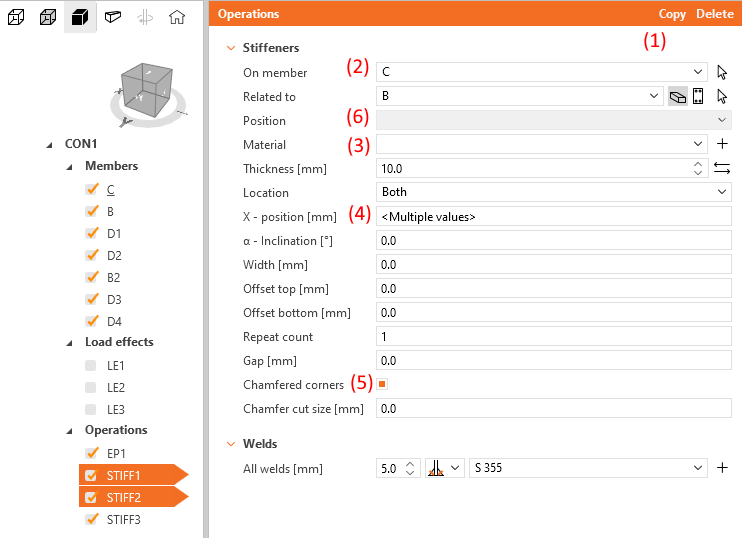
When the same items are selected, copy and delete (1) actions in the property grid header are available. Items are copied in the same order as they were selected.

The property tab is editable respecting these rules:

  • Properties with an identical value show the inputted value (2)
  • Properties with different values are empty in a drop-down menu (3) or show the <Multiple value> in a text field (4)
  • A checkbox with different values shows an orange dot (5)
  • Properties illogical or impossible for bulk editing are greyed out/disabled (6)
When multiple load effects are selected, only copy and delete actions are available.

Selection of different types of items (non-homogenous selection)

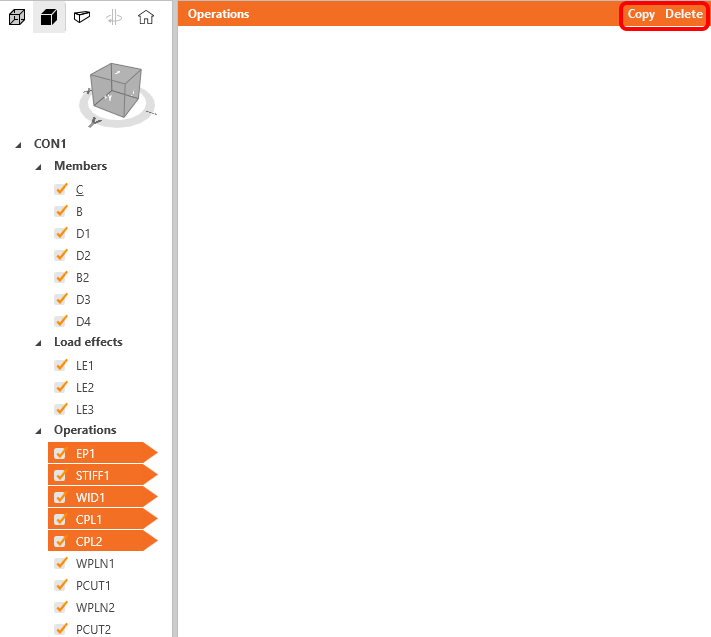
When different items within the same group are multi-selected, the property tab is empty, and only copy and delete actions are available.

When items in different groups (e.g. Members + Operations) are multi-selected, the property tab is empty, and copy and delete actions are not available.
Right-click context menu is not supported for the multi-selected group of items.

Released in IDEA StatiCa version 24.1.

Download the latest version for free

Subscribe to our newsletter

Company

  • About us
  • Partnerships
  • Job openings
  • Patented technology for structural engineers

Resources

  • Customer projects
  • Case studies
  • IDEA StatiCa Connection Library
  • Concrete verifications

Legal

  • IDEA StatiCa END USER LICENSE AGREEMENT
  • Privacy policy
  • Terms of Services – IDEA StatiCa Viewer
  • Licensing

Help

  • Contact
  • Get price quote
  • IDEA StatiCa Specialists
  • Download the latest version
FacebookInstagramLinkedInYouTube

© IDEA StatiCa 2009-2026

Trusted and used worldwide by engineers, fabricators & consultants.