

Version compatibility
IDEA StatiCa software version (e.g., 22.1.3.0789) is described by a number represented by the major version (22), minor version (.1), patch number (.3), and build number (.0789).
Every major and minor version of IDEA StatiCa applications changes project data and makes it impossible to use in the previous versions. This means if you create or save a project in version 22.1, you can not open it in 22.0.
However, patches within the same version are compatible, so if you create or save a project in patch 22.1.3, you can still open it in patch 22.1.0.
The cloud services, such as the Viewer, always generate project files in the latest IDEA StatiCa version and patch released.
Opening an old project in a newer version
Models designed in older versions of IDEA StatiCa may show differences when you upgrade to the newest version. When upgrading to a newer version of the program, you may encounter some differences associated with opening models created in older versions.
To get updated, please read the release notes for every major and minor version released, together with patch updates and lists of resolved bugs.
Below is a list of the most important changes for each new version of the program that may lead to some changes in results:
Changes in version 25.1
STEEL
CONCRETE
There were several essential improvements to the underlying analysis model. The anchor mesh has been refined, the bond stiffness has been recalibrated, and the whole system of constraints between anchors and concrete block has been enhanced to better reflect real load-slip behavior. In addition, the contact interaction representing the bearing of anchors against concrete under shear loading has been tuned based on internal research, various studies, and code guidance. Altogether, these refinements improve the realism of the load transfer mechanism, which means that the results may differ from previous versions — typically being more realistic and less conservative, while remaining safe.
Read the highlights and the full list of improvements in Release notes IDEA StatiCa 25.1.
Changes in version 25.0
STEEL
Read the highlights and the full list of improvements in the Release notes IDEA StatiCa 25.0.
Changes in version 24.1
STEEL
CONCRETE
- 3D Detail is out of BETA and verified for anchoring
- Shear transfer through anchors, shear lugs, and friction
- Lateral Torsional Buckling (Eurocode only)
Read the highlights and the full list of improvements in the Release notes IDEA StatiCa 24.1.
Changes in version 24.0
STEEL
- Out of surface load warning in Member (patch 23.1.1)
CONCRETE
- Accurate calculation of the shear resistance of slabs (patch 23.1.2)
BIM and CLOUD SERVICES
- Checkbot Free structural design hub for all supported FEA and CAD, and termination of the free Viewer plugins
Read the highlights and the full list of improvements in the Release notes IDEA StatiCa 24.0.
Changes in version 23.1
STEEL
- Welds – autodesign, input, warnings, visualization
- Shear force position input and visualization (since patch 23.0.5)
- Warning for welds and bolts connecting the same plates (since patch 23.0.4)
- Filler plate (packing plate) recognition (since patch 23.0.3)
- Detailing improvements for bolts and welds in Eurocode (since patch 23.0.2)
- Limitations to checks of anchors (since patch 23.0.2)
- AISC steel and bolt grade materials for AISC360-22 (since patch 23.0.4)
- Singularity detection in Member (since patch 23.0.3)
CONCRETE
- Interaction code-check advancements in RCS (since patch 23.0.2)
Read the full list of improvements in Release notes IDEA StatiCa 23.1.
Changes in version 23.0
STEEL
- Anchors with stand-off (since patch 22.1.5)
- Detailing improvements for bolts and welds in Eurocode (since patch 23.0.2)
- Limitations to checks of anchors (since patch 23.0.2)
- Load Extreme Selection (since patch 22.1.3)
CONCRETE
- Equivalent time for deflection in Beam (since patch 22.1.3)
- Interaction code-check improvements in RCS (since patch 23.0.2)
Read the full list of improvements in Release notes IDEA StatiCa 23.0.
Changes in version 22.1
STEEL
CONCRETE
Read the full list of improvements in Release notes IDEA StatiCa 22.1.
Changes in version 22.0
STEEL
- Connection Lite update
CONCRETE
Read the full list of improvements in Release notes IDEA StatiCa 22.0.
Changes in version 21.1
STEEL
For users of Template Manager, use version 21.1 to transfer your designs into the new Connection Library.
Read the full list of improvements in Release notes IDEA StatiCa 21.1.
Changes in version 21.0
The biggest change since version 21.0 is in the analytical model of members in Connection, please read the Updated CBFEM solver article, and the Condensed superelements - invisible but essential blog post. The impact of the changes is also described in Analysis model improvements in IDEA StatiCa version 21.0 article.
Read the full list of improvements in Release notes IDEA StatiCa 21.0.
Changes in version 20.1
Here, we point out articles describing the main differences between the older and newer version.
Read the full list of improvements in Release notes IDEA StatiCa Steel 20.1 and Release notes IDEA StatiCa Concrete 20.1.
Changes in version 20
Cleat manufacturing operation refactoring
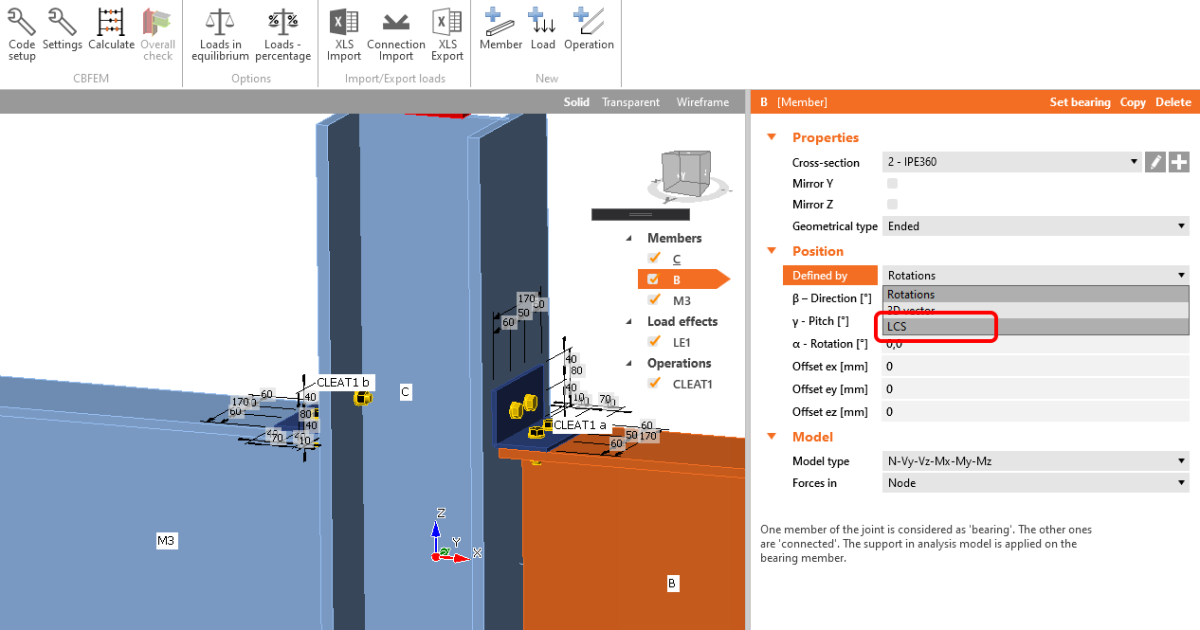
In the previous version Cleat manufacturing operation sometimes made L cross-section legs swapped, mostly while the members were rotated along the longitudinal axis. From now on, the L sections are positioned correctly, and the legs orientation is kept the same while introducing rotation to the member. The new mechanism behind is based on the new member positioning (by its LCS coordinates - rather then it's Rotations).
Local coordinate systems of the members in FEA/CAD applications
All member entities in FEA/CAD applications are created in a way that their definition axis has the start and the end. These two points are taken as a vector to define the local coordinate system of the member. In each FEA/CAD application project are these data information stored and can be used during the import. We took advantage of that, and it helps to improve the correctness of our BIM link geometry import. On the other hand, it changes the rules of the game, and the user must pay attention to the way how the model is created in FEA/CAD because it has an impact on the CBFEM Connection model also. We recommend to pay attention while importing from FEA/CAD projects into the version 20, the local coordinate system of the members may change the model to and difference compared to the model imported into the previous versions is eminent.
Member application projects compatibility
IDEA StatiCa Member application passes through agile development, especially the data storage architecture and the guided user interface. Based on this it's obvious that the projects created in the older versions may not be correctly opened in version 20 or the application may fail to open them. Please be aware of that and excuse IDEA StatiCa for inconvenience.
Read the full list of improvements in Release notes IDEA StatiCa Steel 20.0 and Release notes IDEA StatiCa Concrete 20.0.
Changes in version 10.1 and older
One of the reasons behind the new GUI is that a lot of engineers were saying: „IDEA StatiCa Connection needs to be more error-proof”. These “errors” are usually related to:
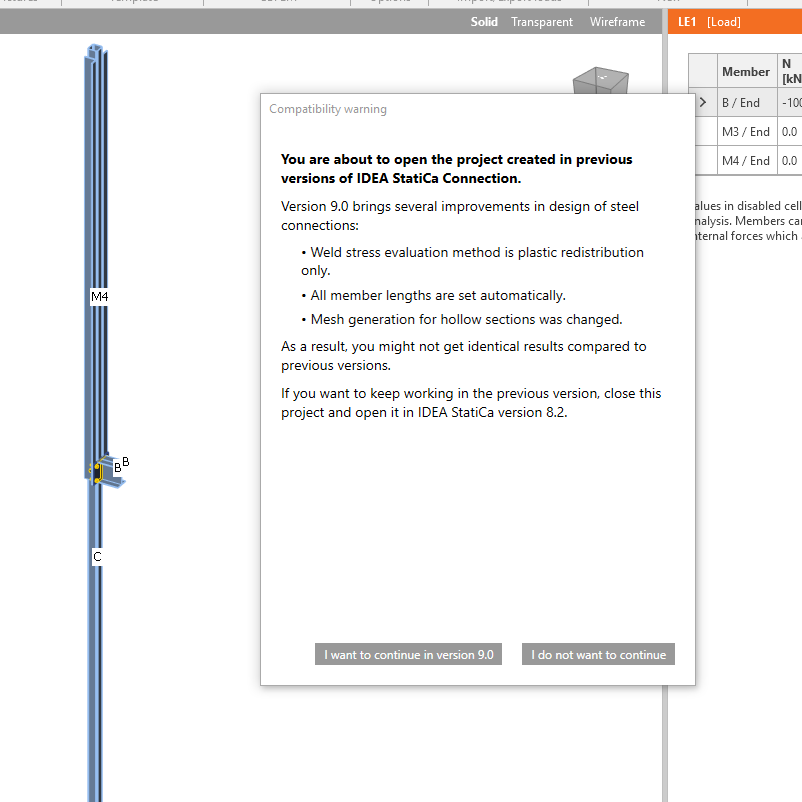
- Setting the correct length of members – in cases of extremely short or long members, this can hugely influence the results. Since version 9, IDEA StatiCa Connection automatically sets an appropriate length of all members.
- Welds – stress plastic redistribution is by far the most accurate design method for welds and was introduced in version 7.1. During version 8 – and as a transition period - it was the default method, coexisting with the other evaluation methods. Since version 9, this method is the only option available and the other evaluation methods have been removed, to avoid confusion among the users, as we have seen through our helpdesk. This ensures that all welds in the project are safely designed and complying with the code.
We have implemented several control mechanisms for IDEA StatiCa Connection since version 9.0 – automatic-check when the connection is modeled in a recommend way (singularity check, member lengths, their offsets, …). If the connection is not modeled properly, the calculation is interrupted or an error message is displayed. Please be aware that because of all of these improvements, opening projects from previous versions can lead to a different model geometry that may need some further editing.
We have also improved meshing of hollow sections members – IDEA StatiCa Connection since version 9.0 generates finer meshing on hollow section members which might lead to slightly different results compared to older versions.
We display the compatibility warning on each opening of a project from the older versions: